
GoldenStar Mobile App
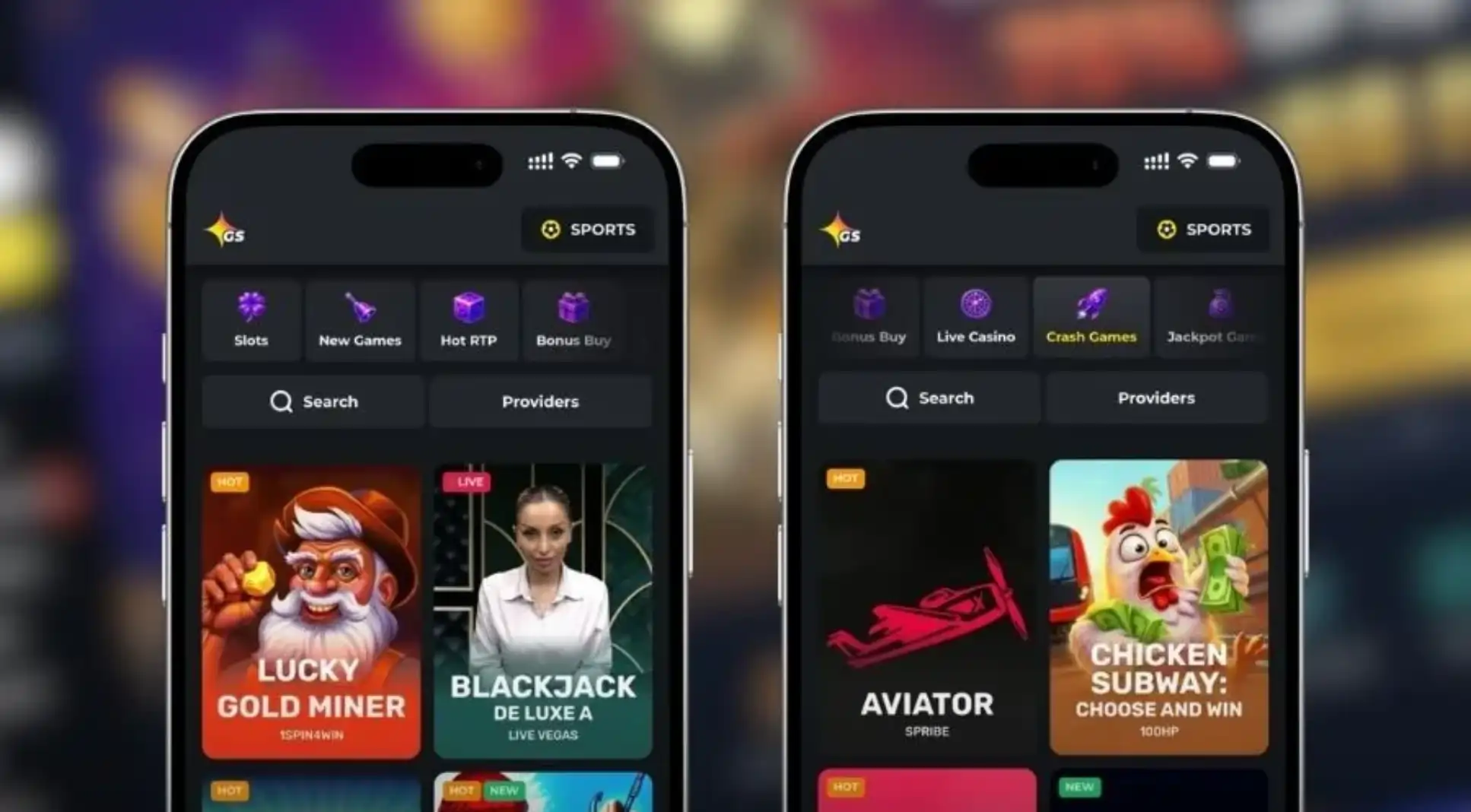

At GoldenStar, we built our mobile app to give you the full casino experience in your pocket. Whether you're waiting for a bus or relaxing at home, Golden Star Casino is always within reach. We designed the app to load fast, run smoothly, and feel just as powerful as our desktop site, without taking up excessive storage on your phone.
Why Players Choose the GoldenStar Casino App
- We offer over 1,000 slots and 2,500 total games optimised for touchscreen play
- Our live casino tables from Evolution and Pragmatic Play run smoothly even on mobile data
- Golden Star's jackpot section, including the four-tier network jackpot, is fully accessible on the app
- We support crypto and e-wallet deposits directly from your phone's browser
- Push notifications keep you informed about cashback, tournaments and new promotions
- Our app works across Android, iOS and tablet devices without separate downloads
How to Get the GoldenStar App
Getting started with our app takes just a few minutes. We've streamlined the process so you can be spinning reels or placing live bets almost immediately after download.
For Android Users
- Visit the GoldenStar website from your Android browser
- Look for the app download banner or visit your account menu
- Download the APK file directly from our servers
- Allow installation from unknown sources in your phone settings
- Open the app and log in or create a new account
For iOS Users
- Open Safari and navigate to the Golden Star casino homepage
- Tap the app icon or follow the 'Add to Home Screen' prompt
- Confirm the installation to add our icon to your device
- Launch the web app like any native application
- Sign in to access your account and start playing
Because Apple restricts real-money gambling apps in its store, we offer a progressive web app instead. It behaves exactly like a native app once installed, and we keep it updated automatically, so you never have to worry about manual updates.
Logging Into Your Account
Once installed, logging in to GoldenStar is simple. We use the same credentials across desktop and mobile, so if you already have a Golden Star Casino account, there's no need to register again. Just enter your username and password, and our system will sync your balance, bonuses and loyalty points instantly. New players can complete registration in just a few minutes.
Security and Fair Play on the App
We at GoldenStar take security seriously, no matter which device you use. The app is licensed under the Tobique Gaming Commission and carries Provably Fair certification, so every spin and every hand is verifiable. We encrypt your personal and payment data the same way we do on desktop, and identity verification is required before certain withdrawals are released, protecting both you and us from fraud.
Our Vegas-style slots and table games run on certified random number generators, and Golden Star works only with licensed providers like NetEnt, Pragmatic Play, Play'n GO and Hacksaw Gaming. If you deposit using Bitcoin, we'll ask you to complete identity verification before your bets are unblocked, which keeps the whole ecosystem safe for everyone.
Technical Requirements
Our app runs comfortably on most modern smartphones. For Android, we recommend version 7.0 or higher with at least 100MB of free storage. For iOS, Safari 11 or newer works best. You'll also want a stable internet connection for live dealer games, since they stream in real time from our studio partners.
Mobile Payment Options
| Method | Minimum Deposit | Processing Time |
|---|---|---|
| Visa/Mastercard | 20 EUR/USD | Up to 5 days (withdrawal) |
| Skrill/Neteller | 20 EUR/USD | Near-instant |
| Bitcoin | 20 EUR equivalent | Near-instant |
| Bank Transfer | 20 EUR/USD | About 7 days |
Claim Free Spins Through the App
We make it easy to grab our welcome offer directly from your phone. Our headline deal gives new players 100% up to 1,000 EUR plus 300 Free Spins, split across your first three deposits using codes GS100, 75DEP and GST50. You can also check out our other seasonal promotions, including the Friday Reload and Wednesday free spins offer, straight from the app's promotions tab. For full details, visit our GoldenStar bonus page.
Our Customer Support on Mobile
We offer full support access directly through the app, so you're never stuck waiting without help.
- Live Chat: Available 24/7/365 through the app menu
- Email: [email protected]
- Social Channels: X, Instagram, Telegram, WhatsApp and Facebook
- Languages: English and Russian support teams on standby

Final Thoughts
Whether you prefer the Android download or the iOS web app, GoldenStar gives you a genuinely polished mobile experience. We've packed over 2,500 games, fast crypto withdrawals and our full VIP programme into a format that fits comfortably in your hand. Join us today, download the app, and discover why so many players choose GoldenStar Casino as their go-to mobile gaming destination.
FAQ
Is the GoldenStar app free to download?
Yes, we never charge anything to download or install our app. You only need funds when you're ready to make a deposit and start playing for real money.
Do you have a native app in the Apple App Store?
No, due to Apple's restrictions on real-money gambling apps, we provide a progressive web app for iOS instead. It installs directly from Safari and functions just like a native app.
Can I use the same account on both the app and desktop site?
Absolutely. Your Golden Star Casino account works seamlessly across every platform we offer, so your balance, bonuses and history stay in sync.
Is my information safe when I play on the app?
Yes, we apply the same encryption and licensing standards to our app as we do to our desktop platform, and we require identity verification for withdrawals to keep your account protected.
What devices are compatible with your app?
Our app supports most Android devices running version 7.0 or higher and iOS devices through Safari. We also optimise the experience for tablets.
Will I lose my bonuses if I switch from desktop to the app?
No, your bonuses, wagering progress and loyalty points carry over automatically whether you play through GoldenStar's app or its desktop version.
Content updated: October 06, 2026